Employers only: TRS reporting systems


Employers only: TRS reporting systems |
|
|
Page last updated 3/24/21 The TRS employer portal provides access to two reporting systems:
•Wage & Contribution Reporting System •Employer Insurance Deduction System
Before business managers or other staff may access the TRS employer portal and use these systems, they must establish the appropriate authorizations with TRS. Once they have been granted access, the primary employer user then must control over other staff members' access to the reporting systems.
All authorized TRS employer portal users, including those with the "Online Administrator" role (described below), must log in at least every 90 days to avoid deactivation of their login credentials. Please note: oIf an employer user has access to both of the reporting systems listed above, the user must log into each system at least every 90 days. oIf an Online Administrator has granted access to another person to perform TRS reporting tasks, the Online Administrator must keep his/her account active by logging in every 90 days. Otherwise, both the Online Administrator's and additional user's login accounts will be deactivated. oUsers whose accounts have been deactivated will be instructed to call TRS to re-establish access.
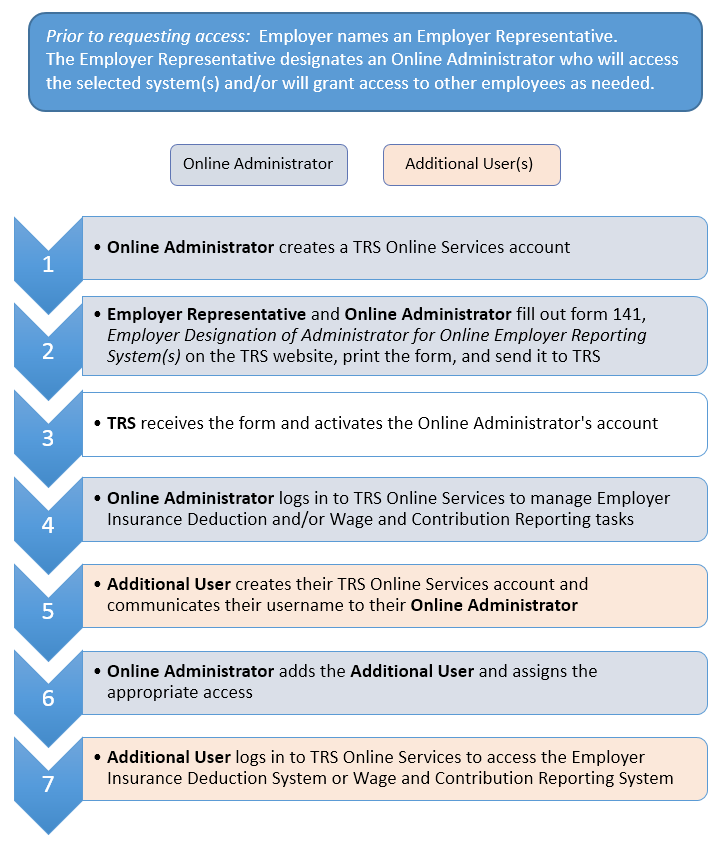
The flowchart below provides an overview of the process by which TRS employers request and manage access.
|