Enhanced security: Two-factor authentication


Enhanced security: Two-factor authentication |
|
|
Page last updated 4/12/21 Verification Code Required at Login TRS has implemented an enhanced security feature called two-factor authentication, which is an industry best practice designed to prevent unauthorized access.
Currently, this enhanced security feature applies to users of the TRS member portal, otherwise known as My TRS.
Employer users: Please read about automatic account deactivation HERE.
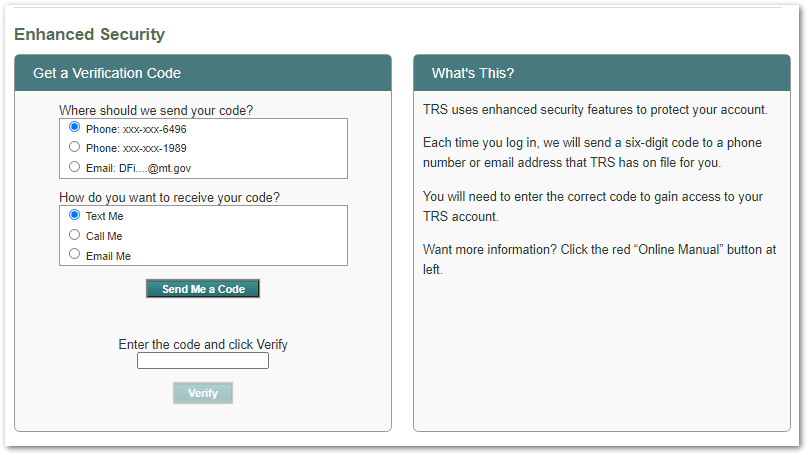
How does it work? If you are a TRS member and you log in with your TRS username and password, you will see an Enhanced Security page listing the email address and/or telephone number(s) TRS has on file for you. Your information will be partially obscured, as shown in the sample image below:
It should take less than a minute to request, receive and enter your 6-digit code. Here are the simple steps:
1.Choose your preferred email address or phone number from the list
2.Then choose a delivery method •For example, if you selected your email address in the first box, you'll need to click "Email me" in the second box.
3.Click the "Send Me a Code" button
4.Retrieve the 6-digit code we sent you •If you selected your Email address in Step 1, look for an email from "Montana TRS" •If you selected a phone number in Step 1, wait for the text message or phone call to arrive with your code
5.Enter the 6-digit code in the box and click the "Verify" button
What if I am unable to retrieve or enter my verification code? •Call TRS at (406) 444-3134 during regular business hours: Monday through Friday, 8:00 am - 5:00 pm (except State holidays). •Our Information Technology staff members will ask you a few questions to confirm your identity before helping you gain access to your TRS account.
(This section does not apply to "My TRS" member portal users)
Employer user accounts are deactivated after 90 days of non-use
All authorized TRS employer portal users, including those with the "Online Administrator" role (described below), must log in at least every 90 days to avoid deactivation of their login credentials. Please note:
oIf an employer user has access to both the Wage & Contribution Reporting System and the Employer Insurance Deduction System, the user must log into each system at least every 90 days. oIf an Online Administrator has granted access to another person to perform TRS reporting tasks, the Online Administrator must keep his/her account active by logging in every 90 days. Otherwise, both the Online Administrator's and additional user's login accounts will be deactivated. oUsers whose accounts have been deactivated will be instructed to call TRS to re-establish access.
|